Salesforce Marketing Cloud Overview
Salesforce Marketing Cloud is a digital marketing platform that helps businesses automate and personalize customer communications across email, mobile, social, and web channels. It is not a single email tool but a suite of products for journey building, data management, account engagement, and customer analytics. This breadth serves large marketing teams well, but it also makes evaluating the platform more complex than buyers typically expect. To understand what Salesforce Marketing Cloud offers, you need to look in practice components: Marketing Cloud Engagement for email and journeys, Marketing Cloud Account Engagement for B2B lead nurturing, Marketing Cloud Personalization for real-time web and app targeting, and Marketing Cloud Data Management for unifying customer profiles. Each product addresses a specific need, yet they work together within the Salesforce ecosystem. This guide provides a clear overview of these products, their key features, and how they fit into a broader marketing technology stack, helping you decide if Marketing Cloud matches your organization's requirements.
A plain-English Salesforce Marketing Cloud overview for B2B buyers: products, use cases, strengths, costs, and when to consider alternatives.
What Salesforce Marketing Cloud Is
Salesforce Marketing Cloud is a suite of digital marketing automation tools built on the Salesforce platform. It handles email, mobile messaging, social media advertising, web personalization, and customer journey orchestration. The core value is connecting these channels to the same customer data that your sales and service teams use in Salesforce CRM.
- For example, if a prospect abandons a shopping cart on your site, Marketing Cloud can trigger a personalized email sequence and a retargeted ad, all based on the same record.
- A common mistake is buying the full suite before you have clean, unified customer data.
- Without that foundation, the tool's segmentation and automation features underperform.
The product lineup includes Marketing Cloud Engagement for email and journeys, Marketing Cloud Account Engagement for B2B lead nurturing, and Marketing Cloud Personalization for website and app experiences. The pricing model is consumption based, so costs scale with your contact count and send volume.
A practical decision rule: if your primary need is B2C email and SMS at high volume, start with Engagement. If you run long B2B sales cycles with multiple touchpoints, Account Engagement is a better fit.
A tradeoff to weigh is that Marketing Cloud is expensive compared to HubSpot Marketing or Adobe Marketo Engage, especially at lower contact tiers. You pay for deep CRM integration and enterprise scale, not for ease of setup. For a B2B buyer, the key is matching the product to your sales motion.
Marketing Cloud excels when your marketing and sales teams share a single CRM view and need to automate handoffs. It is a poor choice if your team is small, your data is messy, or you only need basic email blasts. In those cases, HubSpot Marketing offers faster time to value at lower cost.
The mistake is choosing Marketing Cloud for its brand name without auditing your data hygiene first.
The Main Product Families
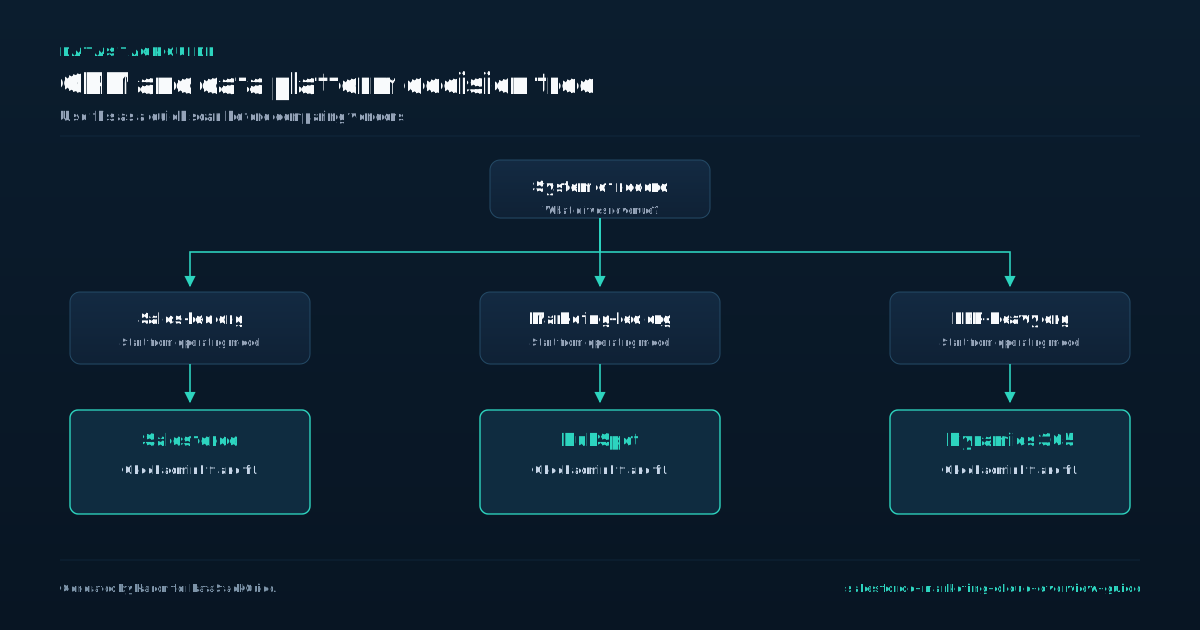
Salesforce's public pricing pages make the product split visible: Marketing Cloud Next starts with Growth and Advanced editions, while Account Engagement is priced separately for B2B automation. Marketing Cloud is not a single product but a collection of separate tools, and the most common mistake buyers make is assuming they need the entire suite.
- If your primary need is sending high-volume, triggered email campaigns to consumers, Engagement is the correct choice.
- If you are a B2B organization that needs to score leads and sync activity with a CRM like Salesforce Sales Cloud, Account Engagement is the right fit.
- Buying both without a clear use case wastes budget and complicates your tech stack.
The core product families break down into three distinct areas: email and journey orchestration (Marketing Cloud Engagement), account-based marketing and B2B lead management (Marketing Cloud Account Engagement, formerly Pardot), and data management and personalization (Marketing Cloud Data Cloud and Personalization).
A practical decision rule is to map your primary channel and audience type before evaluating pricing. The tradeoff is that Account Engagement offers tighter CRM integration for lead scoring, while HubSpot provides a lower entry cost for simpler automation. Adobe Marketo Engage is a direct competitor for B2B but often requires a larger upfront commitment.
The most expensive mistake is buying a product family for a use case it was not designed for. Do not use Account Engagement for consumer email blasts; its strength is in personalized, CRM-driven sequences, not high-volume sends.
Conversely, do not use Engagement for B2B lead scoring; it lacks the native CRM object mapping that Account Engagement provides. If your organization spans both B2C and B2B, you may need both products, but plan for separate budgets and teams.
A safer starting point is to pick one product family, prove ROI with a 90-day pilot, and only then consider adding another.
Where It Fits Best
Where It Fits Best Marketing Cloud fits best when your organization needs to manage complex, multi-channel customer journeys at scale, especially if you already rely on Salesforce for CRM.
- A common mistake is adopting it for basic email blasts or simple lead nurturing,HubSpot Marketing or Salesforce Account Engagement would serve those needs at a lower cost and with less implementation friction.
- Marketing Cloud's strength lies in orchestrating triggered journeys across email, SMS, push notifications, and advertising, then tying those interactions back to individual records in your Salesforce instance.
- If your marketing team is running hundreds of distinct automated paths per month and needs real-time data from Sales Cloud to decide which message a contact receives, this platform justifies its price.
The tradeoff is that Marketing Cloud demands dedicated technical resources. You need at least one person who can write SQL queries for audience segmentation and manage the complex data extensions that power personalization. Without that skill set, you will pay for capabilities you cannot use.
A practical decision rule: if your marketing operations team has no SQL experience and you cannot hire for it, look at Account Engagement or HubSpot first. Those tools let marketers build logic through drag-and-drop interfaces rather than code. Pricing is the other gate.
Marketing Cloud starts higher than HubSpot Marketing and Adobe Marketo Engage, and costs escalate quickly as you add contact records or higher-tier features like predictive intelligence. Budget for at least one full-time administrator or a certified partner during the first year.
Choose it only when you have both the data complexity and the operational maturity to use its automation engine daily.
Where It Is Too Heavy
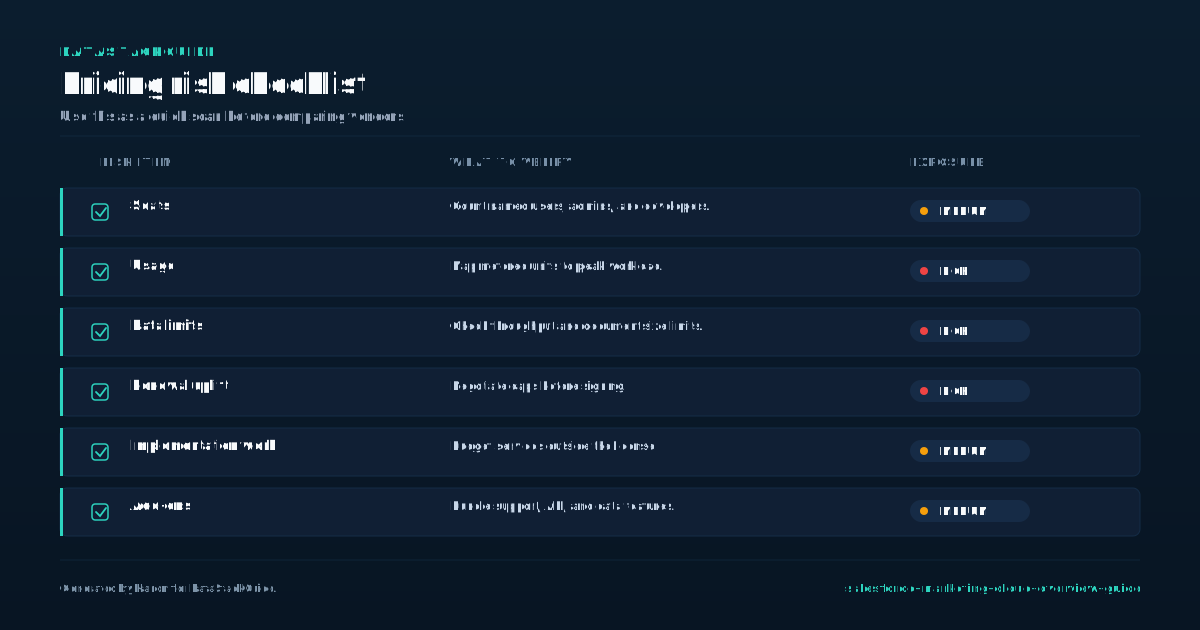
Where It Is Too Heavy Marketing Cloud's modular architecture is its greatest strength and its most dangerous trap. Each product,Email Studio, Mobile Studio, Journey Builder, Advertising Studio,bills separately. A better decision rule: start with Journey Builder plus one channel studio, then add modules only after you prove a specific campaign requires them.
- A typical Marketing Cloud deployment with data model design, SQL-based segmentation, and AMPscript customizations takes a quarter or more.
- Compare that to HubSpot Marketing, where a similar setup runs a shorter implementation window, or Adobe Marketo Engage at a mid-length implementation window.
- If your marketing team needs to launch campaigns in the next quarter, the longer timeline creates a painful gap.
The weight also shows in implementation time. One B2B manufacturer lost three months of lead generation because their Salesforce onboarding consultant was double-booked. The tradeoff: you get extreme customization, but you pay for it in calendar time. Pricing transparency is another hidden weight.
Salesforce Account Engagement (formerly Pardot) offers clearer tiered pricing, but its feature set is narrower. Otherwise, the platform you chose for flexibility becomes the anchor on your marketing budget.
Implementation Requirements
Implementation requirements for Salesforce Marketing Cloud depend heavily on how you intend to use the platform. The core licensing model charges per contact record, with separate add-ons for SMS, push notifications, and data storage. A common mistake is underestimating the cost of data management.
- For example, if you import raw CRM data without deduplication, you pay for duplicate contacts.
- Compare this to HubSpot Marketing, which includes basic data cleaning in its subscription, or Adobe Marketo Engage, which charges by database size rather than contact count.
- Technical setup requires a dedicated IT resource for at least the first three months.
You need to configure data extensions, SQL queries for segmentation, and API integrations with your CRM. The tradeoff: Salesforce Marketing Cloud offers deep customization but demands SQL knowledge, whereas Salesforce Account Engagement (formerly Pardot) uses a simpler drag-and-drop builder. If your team lacks SQL skills, expect a longer ramp-up time.
A concrete example: a B2B company migrating from HubSpot to Marketing Cloud spent six weeks just mapping lead scoring fields, delaying their first campaign by two months. Ongoing maintenance is often overlooked. You must schedule regular data audits to remove stale contacts and update suppression lists. A mistake is treating implementation as a one-time project.
Instead, plan for quarterly reviews of your data architecture. The pricing difference matters here: Salesforce Marketing Cloud's annual contract typically includes support hours, but exceeding those hours costs extra. For comparison, Adobe Marketo Engage includes more standard support, while HubSpot Marketing offers unlimited onboarding calls.
Your choice depends on whether you prefer lower upfront costs with variable support fees or a higher fixed price with predictable service.
Data and CRM Dependencies
Your Salesforce Marketing Cloud instance is only as good as the data feeding it. The platform pulls customer records, engagement history, and behavioral triggers from your CRM, typically Salesforce Sales or Service Cloud. A common mistake is assuming Marketing Cloud operates independently.
- If your CRM has duplicate contacts, incomplete fields, or stale lead statuses, your email sends, journey logic, and segmentation will inherit those flaws.
- For example, if your sales team never logs call outcomes, you cannot build a journey that sends a follow-up email only to prospects who did not answer.
- The tradeoff is that cleaning your CRM first delays your go-live but prevents wasted sends and low deliverability.
Before purchasing, audit your CRM data hygiene. Pricing dependencies also matter. Salesforce Marketing Cloud pricing is usage-based, often tied to your contact count and send volume. If your CRM grows faster than expected, your Marketing Cloud bill can spike unpredictably.
Compare this to HubSpot Marketing pricing, which caps costs at a tier level, or Adobe Marketo Engage pricing, which bundles contacts into annual contracts. Ignoring this dependency leads to budget surprises that force you to trim sends or downgrade features. Finally, consider how your CRM data structure maps to Marketing Cloud's data model.
Marketing Cloud uses data extensions, not CRM objects, so you must decide which fields sync and how often. A practical buyer guidance: plan for a weekly sync of core fields like email, name, and lead score, but keep transactional data like purchase history in a separate real-time API feed.
The mistake is syncing everything daily, which slows both systems. The tradeoff is that selective syncing reduces complexity but requires you to document which data lives where, or your marketing team will struggle to build targeted segments.
Common Alternatives to Compare
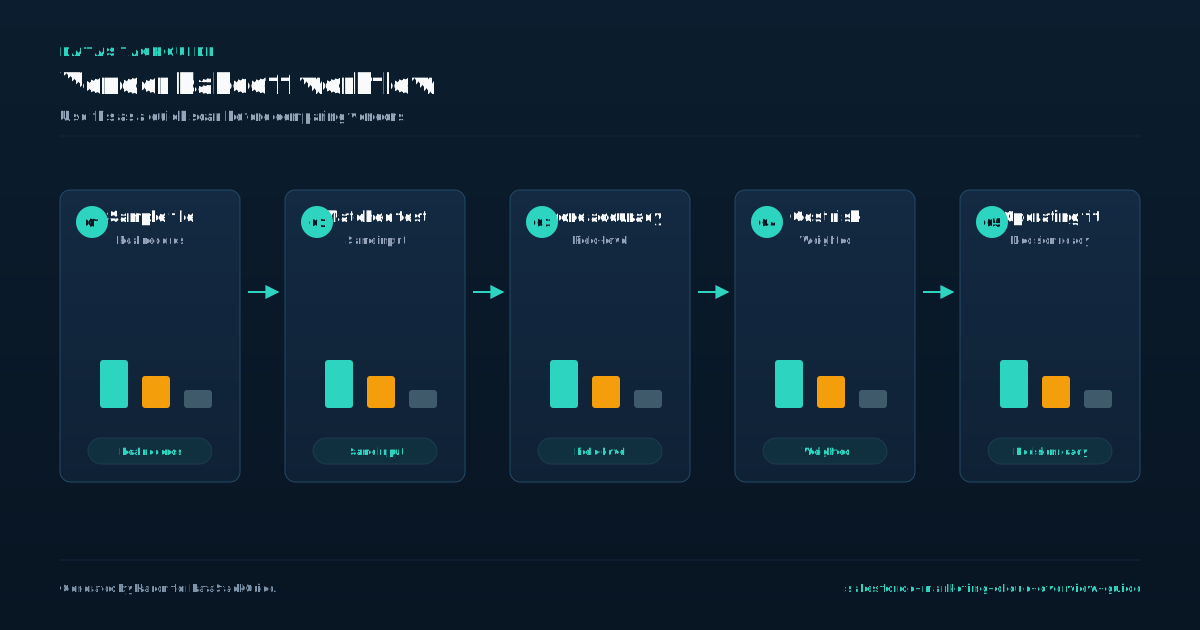
Most teams comparing Marketing Cloud end up weighing it against HubSpot Marketing Hub and Adobe Marketo Engage. HubSpot works well for companies with under a focused contact sample who want an all-in-one CRM and marketing tool with predictable monthly costs.
- Marketo Engage fits organizations needing complex lead scoring and multi-touch attribution, often in regulated industries like finance or healthcare.
- A common mistake is choosing Marketing Cloud for basic email sends when HubSpot would cost less and require less technical setup.
- Marketing Cloud charges based on contact count and sends, with overage fees that can double your bill during peak campaigns.
Pricing differences often catch buyers off guard. HubSpot caps sends at your tier level but allows unlimited emails within that cap. Marketo uses a database model where you pay for total records, not just active contacts. The tradeoff is that Marketing Cloud gives you SQL-based segmentation and real-time data processing that HubSpot cannot match.
Your decision should hinge on data complexity and team capability. If your marketing team includes SQL analysts and you need to sync purchase history, support tickets, and web behavior into single customer views, Marketing Cloud justifies its premium.
If your team relies on drag-and-drop builders and you want one platform for CRM and marketing, HubSpot removes integration headaches. Marketo fits between them, offering strong lead management without Marketing Cloud's data infrastructure costs. Test your top three use cases in each platform's free trial before committing to annual contracts.
Evaluation Checklist for Buyers
Before you commit to Salesforce Marketing Cloud, map your actual sending volume and database size against the three core pricing tiers: Marketing Cloud Engagement, Account Engagement, and the bundled Marketing Cloud Growth Edition. A common mistake is buying the full Engagement suite when your team only needs email automation and basic segmentation.
- Evaluate your integration maturity against the platform's data model.
- Marketing Cloud uses a subscriber-level data structure, not a standard relational database.
- This means you must flatten custom objects and store historical attributes in data extensions.
Teams that skip this step often find their segmentation logic breaks when syncing from Salesforce CRM. A practical rule: if your marketing team cannot write a simple SQL query or use Query Studio, budget for a part-time data architect for the first three months. Finally, test the platform's reporting limitations during your trial.
Marketing Cloud's standard dashboards show opens and clicks but do not track revenue attribution by campaign without a separate connector to Sales Cloud. If your CFO demands ROI per email send, you will need to build custom data extensions and use the Marketing Cloud Connector to pull opportunity data.
This adds two to four weeks of setup time. HubSpot Marketing includes native revenue attribution in its Professional plan, while Marketo Engage requires a separate Revenue Cycle Analytics add-on. The tradeoff is clear: choose Marketing Cloud for enterprise-scale send reliability and CRM-native data, but only if your team can manage its data architecture requirements.
Tools Mentioned in This Guide
Related Categories
Sources
Frequently Asked Questions
What is Salesforce Marketing Cloud used for?
Salesforce Marketing Cloud is used for digital marketing automation. It helps businesses send personalized emails, manage customer journeys, run targeted ads, and analyze campaign performance.
The platform unifies customer data from multiple sources to create tailored communications across email, mobile, social media, and web. Marketers use it to automate tasks, segment audiences, and track engagement in real time.
It serves B2C and B2B companies aiming to improve customer relationships and drive revenue through data-driven marketing.
Is Salesforce Marketing Cloud the same as Pardot?
No, Salesforce Marketing Cloud and Pardot are different products. Marketing Cloud is for B2C marketing, focusing on mass email, SMS, and customer journeys across channels.
Pardot is for B2B marketing, emphasizing lead generation, lead scoring, and CRM integration with Sales Cloud. They serve distinct audiences and use cases.
Who should use Salesforce Marketing Cloud?
Salesforce Marketing Cloud is for marketing teams in mid to large businesses that need to manage customer journeys across email, mobile, social, and web.
It suits B2C and B2B companies with complex segmentation needs, high email volumes, or multi channel campaigns. Digital marketers, CRM managers, and data analysts use it to automate personalized messaging and track performance.
Small teams with basic email needs may find simpler tools more practical.
What are Salesforce Marketing Cloud alternatives?
Top alternatives include HubSpot Marketing Hub for mid-market inbound marketing, Oracle Eloqua for B2B automation, and Mailchimp for small businesses. Braze excels in mobile engagement, while ActiveCampaign offers affordable email automation.
For enterprise needs, consider Adobe Marketo Engage or Salesforce Marketing Cloud Account Engagement (formerly Pardot). Each platform varies in pricing, channel support, and analytics depth.
What should a Salesforce Marketing Cloud overview cover?
Salesforce Marketing Cloud is a digital marketing platform for automating and managing customer journeys across email, mobile, social, and web. It includes tools for email marketing, advertising, analytics, and personalization.
Marketers use it to send targeted messages, track engagement, and build customer segments. Products within the suite include Email Studio, Mobile Studio, and Journey Builder.

Rome Thorndike
Rome Thorndike is the CEO & Founder of Provyx, which provides GTM intelligence and data validation for healthcare companies, including EngagedMD and BTL Industries. He led sales at Datajoy, acquired by Databricks, and sold analytics and enterprise platforms at Microsoft and Salesforce.
Connect on LinkedIn